Meesho Label Cropper
Crop Meesho shipping labels online: cut off the invoice or keep it, fit the PDF to your printer, and sort it the way you pack.
- 100% free
- No login
- Files never leave your device
What you can configure
- Printer type
- Label printer (3x5" / 4x6"), or A4 paper with 1, 2, or 4 labels per sheet.
- Invoice handling
- Crop the invoice away, keep it attached, or save invoices as a separate PDF.
- Sort order
- Original order, SKU, courier, pickup hub, or color and size — match how you pack.
- Custom text & order #
- Stamp a note or the order number onto each label.
- SKU order summary
- A downloadable count of every SKU across the batch, for packing.
- Private by design
- Everything runs in your browser — your labels and customer details are never uploaded.
Meesho label crop with invoice, or without
One setting decides what happens to the tax invoice under each label. Your original PDF is never changed.
Label only
Invoice: Crop it away
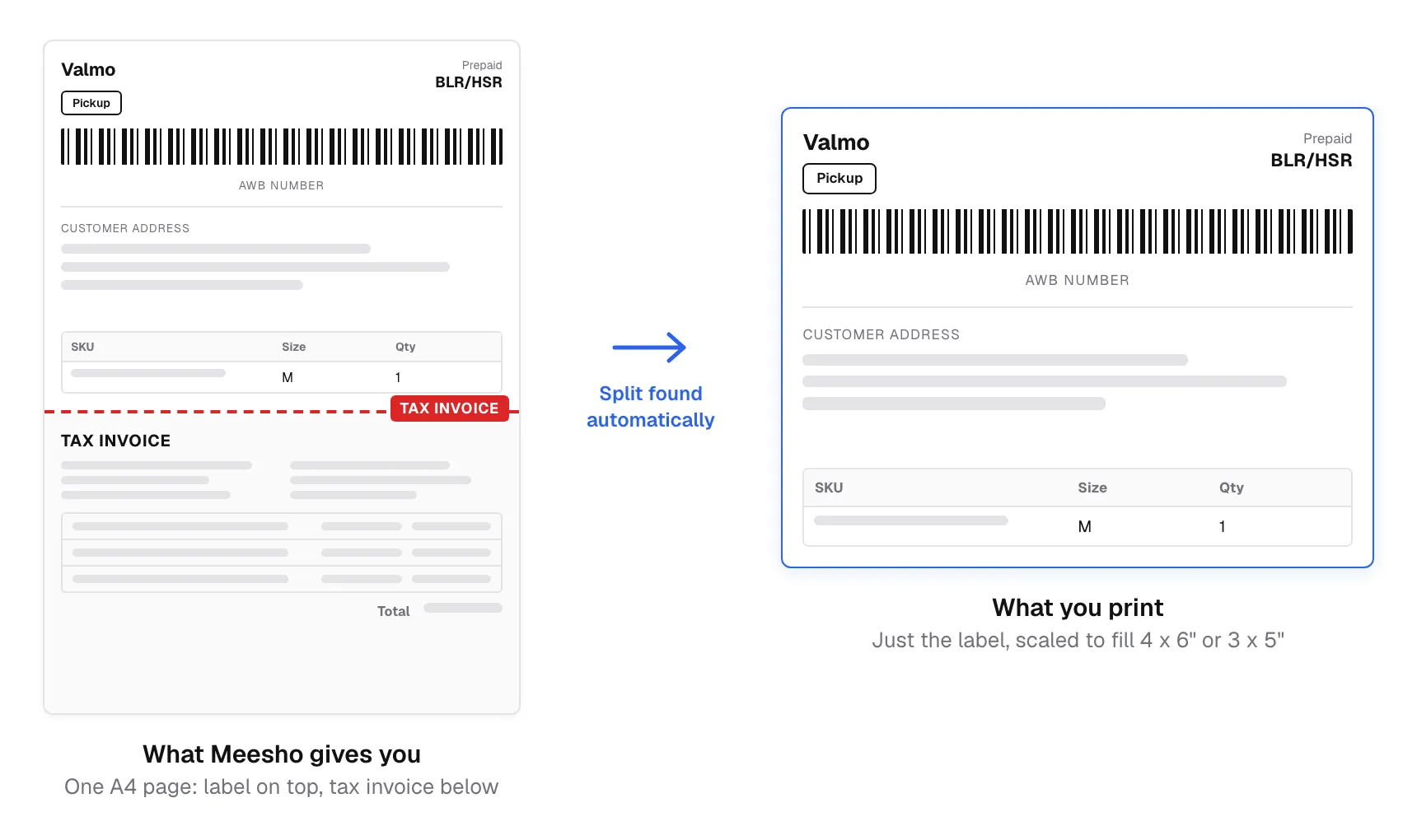
The usual Meesho label crop. The tax invoice is cut off at its heading and you get the shipping label on its own, sized for your printer.
Label with invoice
Invoice: Keep it
Nothing is cut off. Each page keeps its label and its invoice, and you still get the sorting, the resizing and the SKU summary.
Label and invoice, as two PDFs
Save invoices as a separate PDF
Labels go to the printer as one file; the cropped-off invoices are saved as a second PDF, one per page, for your GST records.
Works with every Meesho courier
The cut line is found by reading the page text for the TAX INVOICEheading, not by slicing at a fixed height. Courier names are read from where they sit on the label rather than matched against a list — so a courier we have never seen still works.
- ValmoMeesho's own logistics arm, now on a large share of orders.
- DelhiveryThe format the boundary detection was first confirmed against.
- ShadowfaxSame label structure, different header art.
- XpressbeesHandled by the same text-anchored crop.
- EkartRecognised without any courier-specific rule.
- Ecom ExpressAnd any other courier Meesho assigns you.
Meesho label size: 4x6, 3x5 or A4?
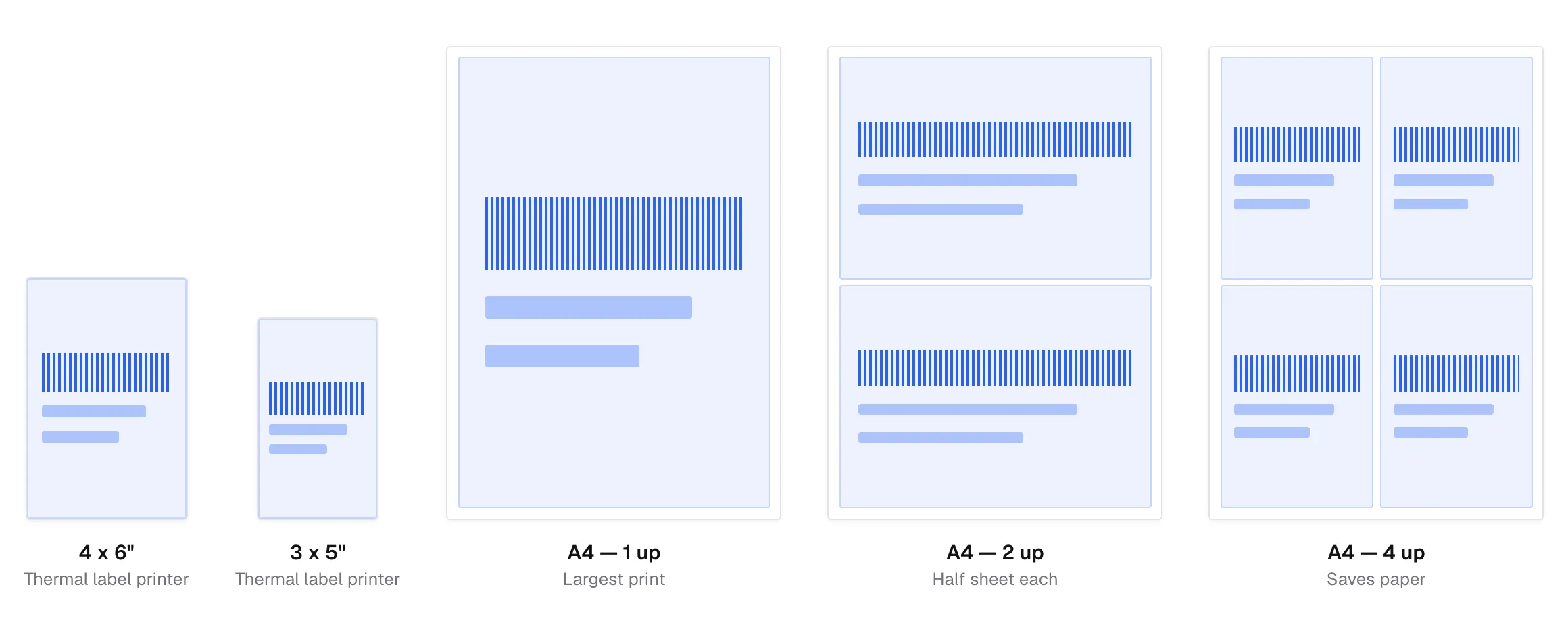
In supported PDFs the label appears above the invoice. Crop to 4x6 inches or 3x5 for a thermal label printer, or crop to A4 with 1, 2 or 4 labels on a sheet for an ordinary printer.
4 x 6 inch
The common thermal sizeExact 4×6 inches is 101.6×152.4 mm and remains the default preset. Match the driver and measured stock; print and scan a sample.
3 x 5 inch
Smaller thermal rollsSame idea at a smaller page size. Pick this only if your roll is genuinely 3x5 — printing a 4x6 label on a 3x5 roll crops it, rather than shrinking it.
A4, 1 / 2 / 4 per sheet
No thermal printer yetPacks cropped labels onto an ordinary A4 sheet with a quarter-inch margin, rotating each label to fill its cell. Four per sheet is the usual choice: cut once across and once down.
What's on a Meesho shipping label
Worth knowing, because these are the fields the cropper can sort and stamp by.
- AWB number
- The 12–20 digit tracking number printed above the barcode. It is what the courier scans, and what your customer types into a tracking page.
- SKU
- Your own product code. The cropper reads it from the product table and can sort the whole batch by it, so identical items come off the printer together.
- Pickup hub
- The courier branch collecting the parcel, printed under the courier name. Sorting by hub groups everything going out on the same van.
- Tax invoice
- The GST invoice Meesho prints on the same page, below the label. It is not part of the shipping label and is what the cropper removes — though you can keep it, or save all invoices into a separate PDF for your records.
Guides for printing and packing
Longer walkthroughs of the parts this page only summarises.
- Getting startedHow to crop a Meesho shipping label to 4x6 (free, online)Meesho gives you an A4 page with the label on top and the invoice below. How to crop the shipping label to 4x6, 3x5 or A4 and print it at the right size.
- PrintingMeesho label size — 4x6, 3x5 or A4, and which to print onWhat size a Meesho shipping label is, why the downloaded file is A4, and which label size to pick for a thermal printer or ordinary A4 paper.
- Getting startedMeesho label crop with invoice — keep, remove or save itThree ways to handle the tax invoice when you crop Meesho labels — label only, label with invoice, or labels and invoices as two PDFs — and when to use each.
- PrintingHow to print Meesho labels on a thermal printer4x6 and 3x5 settings for TSC, TVS, Rugtek and Honeywell printers — crop the invoice first, print at 100%, and stop wasting label rolls.
Meesho label cropping, answered
The questions sellers ask most about this tool.
Can I crop Meesho labels with the invoice?
What size is a Meesho shipping label?
Does it work with Valmo labels?
Will the cropped label print at the right size on my thermal printer?
Can I print Meesho labels without a thermal printer?
How many labels can I crop at once?
Does the tool remove the tax invoice permanently?
Is it safe to upload my customer addresses here?
Got questions?
How the tool works, and why your data stays safe.