Meesho Profit Calculator
Your real profit from the payment file itself — settlement, costs, ads and per-SKU margin.
- 100% free
- No login
- Files never leave your device
Where to find this file
Open panel- Supplier panel
- Payments
- Download
- Payments to Date
- Pick your dates
It downloads as *_PAYMENT_FILE_*.xlsx. Those dates are payment dates, not order dates, so the file usually holds orders placed weeks earlier.
What it works out
- Reads the real payout
- Uses Meesho's own Final Settlement Amount, so commission, shipping, GST and TCS/TDS are already accounted for.
- Counts every settlement leg
- Meesho splits some orders across two rows, the second with a blank status. Those adjustment rows are included, not dropped.
- Subtracts ads spend
- Campaign spend is an account-level cost and is deducted from net profit rather than quietly ignored.
- Per-SKU margin
- Add your making and packaging cost once and see which products actually earn, and which ones only look busy.
- Handles RTO and returns
- Set how much of an RTO or return you really lose, so profit reflects what happened, not a best case.
- Charts that show the leak
- A breakdown of where every rupee went, how your orders ended up, and which SKUs make or lose the most.
- Costs in and out as Excel
- Export every SKU to a spreadsheet, fill the costs in Excel, and import it back — no typing them one by one.
- Private by design
- Your payment file is parsed in the browser. It is never uploaded, and your SKU costs stay on your device.
Which file do I upload?
In the Meesho supplier panel, open Payments, press Download and choose Payments to Date, then pick the period you want. It arrives as a *_PAYMENT_FILE_*.xlsx spreadsheet, and that one file is everything the calculator needs.
The same Download button also offers GST Report, Tax Invoice, Supplier Tax Invoice and Outstanding Payments. None of those carry the per-order settlement rows, so the calculator can't read them — it is specifically Payments to Date you want.
The dates in the file name are payment dates, not order dates, so a file usually includes orders placed weeks earlier. You can add more than one payment file at once to cover a longer stretch.
Just sorted your labels? The Meesho label cropper handles the packing side of the same batch.
What Meesho takes before you're paid
All of these are already subtracted by the time the Final Settlement Amount reaches your bank, which is why the calculator starts from that figure rather than from order value.
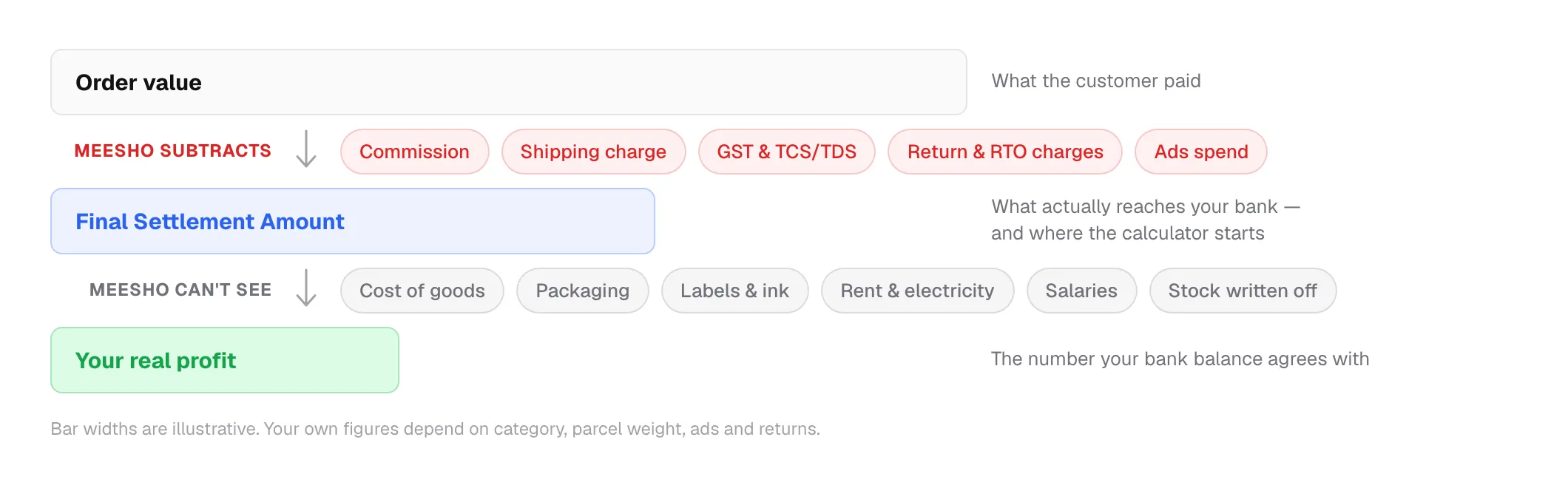
- Commission
- Meesho's cut of the order. It varies by category and by price slab, so two products at the same price can be charged differently.
- Shipping charge
- Charged on the parcel's weight and the distance it travels. A light item sent across the country can cost more to ship than a heavier local order.
- GST and TCS/TDS
- Tax collected and deposited against your GSTIN and PAN. It is real money out of the settlement, and it is already subtracted before the amount reaches you.
- Return and RTO charges
- A shipping charge is levied on parcels that come back, whether the customer returned it or it was never delivered. You also get the stock back, sometimes unsellable.
- Ads spend
- If you run campaigns, this is deducted at the account level rather than per order — which is why a profitable-looking product list can still add up to a loss.
- Compensation and claims
- Amounts Meesho adds back for lost or damaged parcels. These land as separate rows, and the calculator counts them.
And what it doesn't know about
Meesho can report what it paid you. It cannot report profit, because none of this is visible to it — and this is exactly the gap the calculator asks you to fill in:
- What each item cost you to make or buy
- Packaging material and tape
- Labels, ink, and printer paper
- Rent, electricity and internet
- Salaries, including your own
- Stock written off after a return comes back unsellable
Guides on payments and margin
Where the settlement figure comes from, and what it leaves out.
Meesho profit, answered
What sellers ask most about payments, settlements and margin.